Act now to save up to 10% on Shared Web Hosting. Coupon XMART10 Hurry, sale ends soon!

How to Repair database via phpMyAdmin in cpanel?

1. Log into your cpanel account.

2. In the "Databases" section, click on "phpMyAdmin" Icon.


3. In left side-bar,. expand babies to expand database like "example".


. Under your cpanel username, you can see list of all databases. Select appropriate database which you want to repair.


5. Scroll down and mark "Check All" then. Drop-down option and select "Repair table".
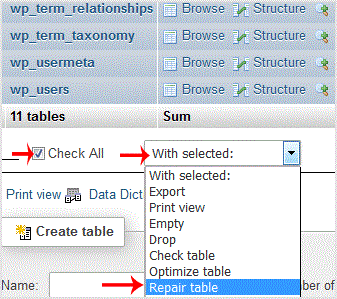

If table successfully repaired then it will show a "Ok" message otherwise it will show some error on few tables like "Error unknown engine" related errors.


  • 2 Users Found This Useful
Was this answer helpful?

Related Articles

How to delete a database in cpanel?

1. Log into your cpanel account.2. In the "Databases" section, click on "SQL Databae"...

How to rename a database in cpanel?

1. Log into your cpanel account.2. In the "Databases" section, click on "SQL Databae"...

How to Create a Database Username in cpanel?

1. Log into your cpanel account.2. In the "Databases" section, click on "SQL Databae"...

How to create a database in cpanel?

1. Log into your cpanel account.2. In the "Databases" section, click on "SQL Databae"...

How to add a user to a database and add privileges?

1. Log into your cpanel account.2. In the "Databases" section, click on "SQL Databae"...